How to roll out application updates to the user? With clickonce it´s quite easy and very comfortable to publish new versions of developed applications. Combined with Github-Actions (GH) and Github-Pages the applications can be rolled out at an official trusted source. And by signing application with a certificate the trust can be raised.
Application
The application itself is a small graphical programming tool (using avr-dude) for a LED-Cube. The application can be found here.
Create a self-signed certificate for code signing
Certificat Authorities that are built with openssl (see here) needs to be exported as *.pfx. This is necessary because the self-signed certificate itself has to be built with powershell. Otherwise it does not work on building the application with github-actions.
It was not possible to find out why the generated self-signed pfx-certificate with openssl does not work on github-actions. The error message in the build pipeline does not print useful information.
openssl pkcs12 -export -out rootCA.pfx -inkey rootCA.key -in rootCA.crt
Now it is possible to create the necessary pfx-certificate for click-once deployment with powershell.
$rootCert = Import-PfxCertificate -FilePath ".\rootCA.pfx" -CertStoreLocation Cert:\CurrentUser\My -Password (ConvertTo-SecureString "A_VERY_SECRET_PASSWORD" -AsPlainText -Force)

$newCert = New-SelfSignedCertificate -Subject "CN=0x007e.github.io" `
  -CertStoreLocation Cert:\CurrentUser\My `
  -Signer $rootCert `
  -KeyExportPolicy Exportable `
  -KeyAlgorithm RSA `
  -KeyLength 2048 `
  -NotAfter (Get-Date).AddYears(10) `
  -HashAlgorithm SHA256 `
  -KeyUsage DigitalSignature, KeyEncipherment `
  -TextExtension @("2.5.29.37={text}1.3.6.1.5.5.7.3.3")

$pwd = ConvertTo-SecureString -String "A_VERY_VERY_SECRET_PASSWORD" -Force -AsPlainText
Export-PfxCertificate -Cert $newCert -FilePath "clickonce.pfx" -Password $pwd
To show the thumbprint of the certificate just write:
(Get-ChildItem Cert:\CurrentUser\My -DnsName "0x007e.github.io").Thumbprint
This thumbprint should be equal to the thumbprint in
ClickOnceProfile.xmlthat is generated in the next steps!
Settings in VisualStudio
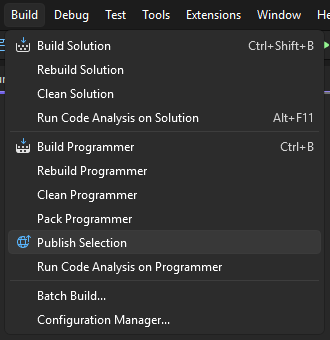
To Setup a ClickOnce application just click Build -> Publish Selection
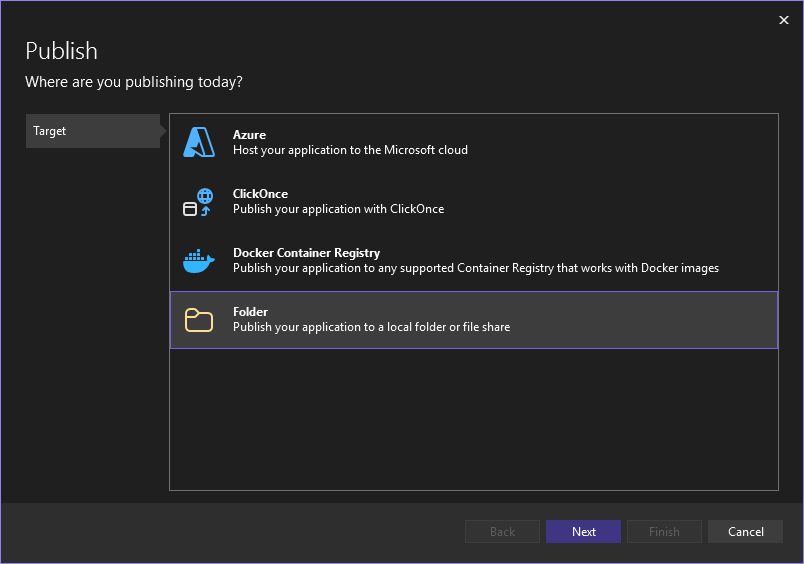
Create a new profile and select Folder in Target section.
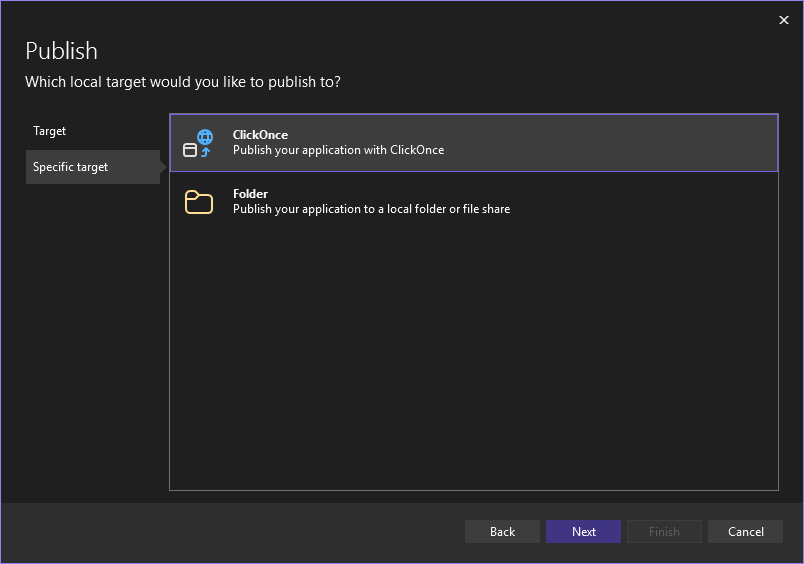
Select ClickOnce as sepcific target.
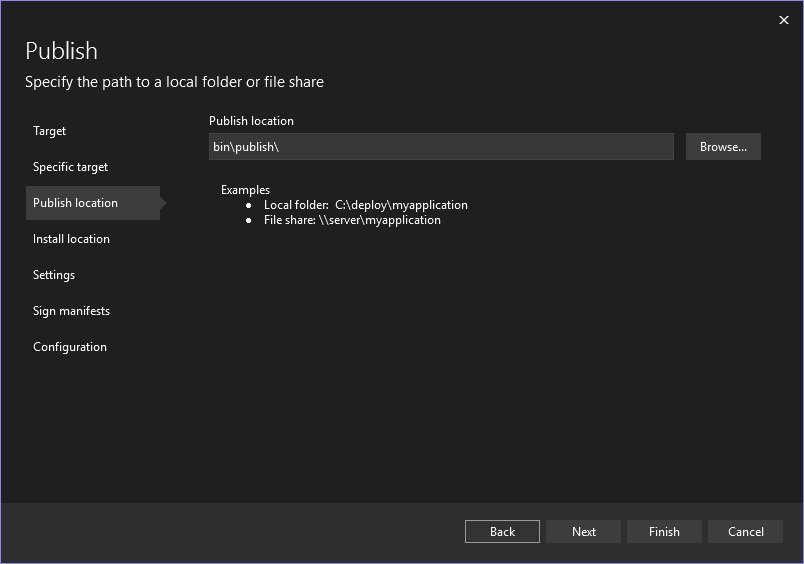
Choose a Folder where the application should be bulit into.
In the next step it is necessary to add a link/UNC-path or a media where the applications is accessible. In cause of releasing the application on github I added the link to my github-page where the application will be published to.
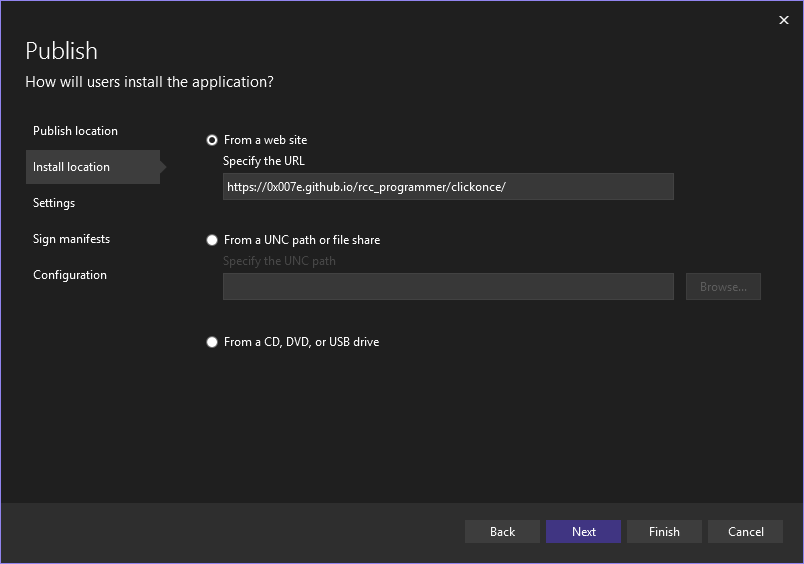
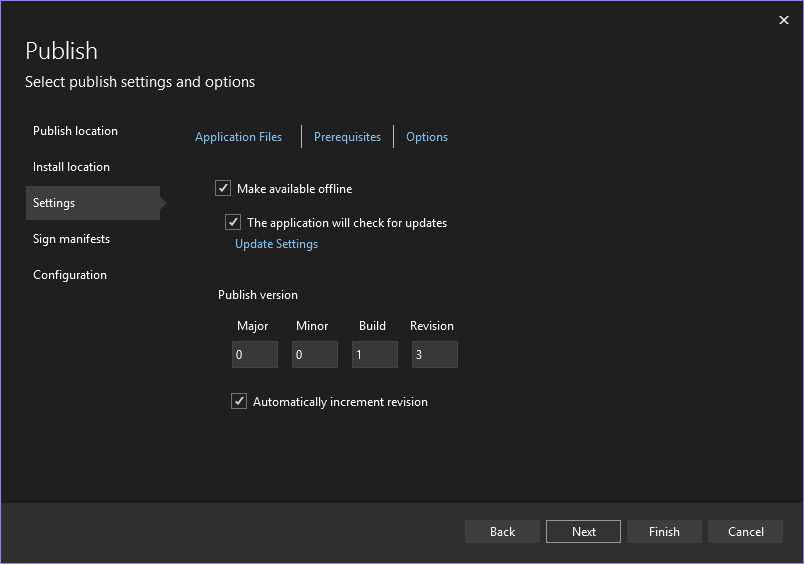
Modify settings to check for updates during startup and increase the version automatically.
Select the previously created self-signed certificate (clickonce.pfx).
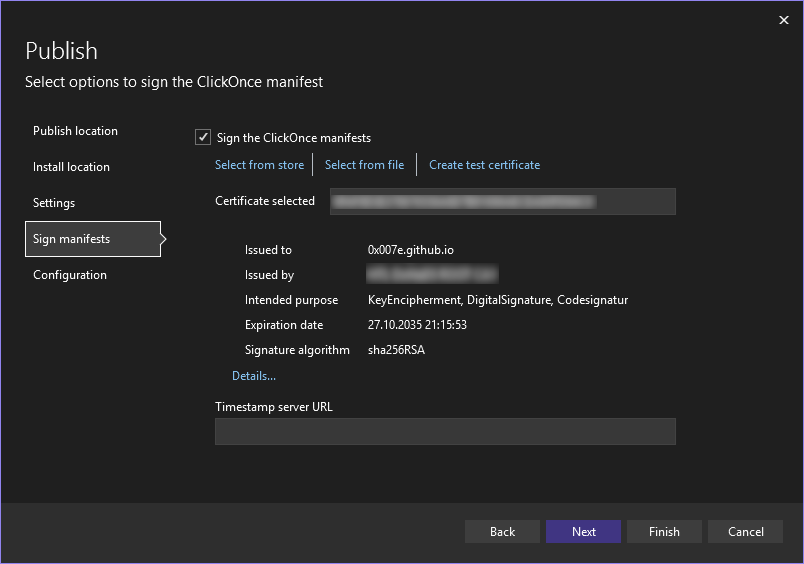
The Thumbprint should be the same that gets printed on the
powershellterminal after creating the certificate!
Select your preferred build settings and finish the configuration process.
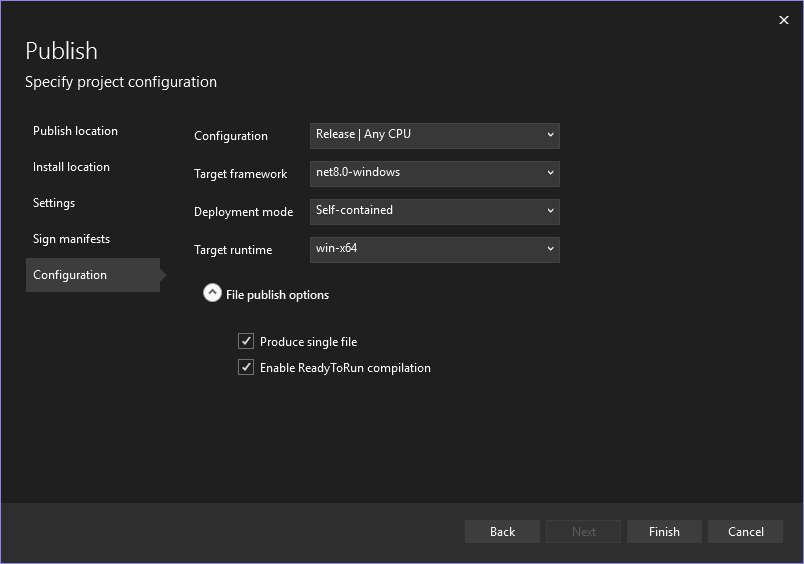
To check if the configuration works run a local demo publish.
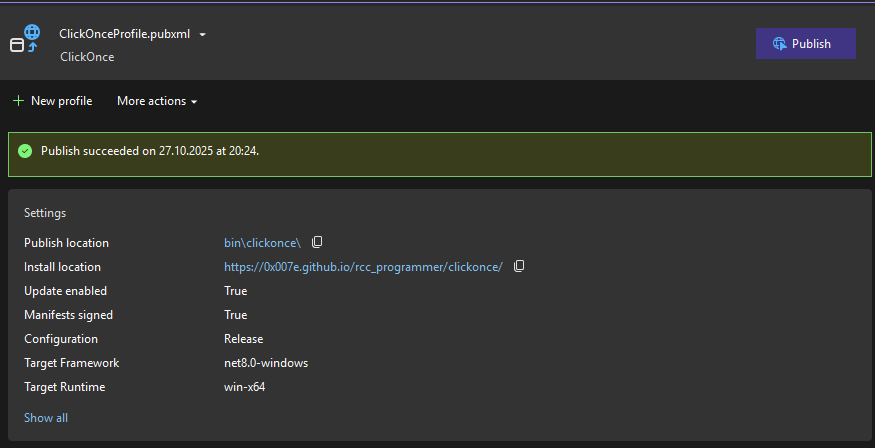
Now there should be a ClickOnceProfile.xml in the Properties sub-folder Publish-Profiles that looks like:
<?xml version="1.0" encoding="utf-8"?>
<!-- https://go.microsoft.com/fwlink/?LinkID=208121. -->
<Project>
  <PropertyGroup>
    <ApplicationRevision>3</ApplicationRevision>
    <ApplicationVersion>0.0.1.*</ApplicationVersion>
    <BootstrapperEnabled>True</BootstrapperEnabled>
    <Configuration>Release</Configuration>
    <CreateWebPageOnPublish>True</CreateWebPageOnPublish>
    <GenerateManifests>true</GenerateManifests>
    <Install>True</Install>
    <InstallFrom>Web</InstallFrom>
    <InstallUrl>https://0x007e.github.io/rcc_programmer/clickonce/</InstallUrl>
    <IsRevisionIncremented>True</IsRevisionIncremented>
    <IsWebBootstrapper>True</IsWebBootstrapper>
    <ManifestCertificateThumbprint>ABCDEF01234567890ABCDEF01234567890ABCDEF</ManifestCertificateThumbprint>
    <MapFileExtensions>True</MapFileExtensions>
    <OpenBrowserOnPublish>False</OpenBrowserOnPublish>
    <Platform>Any CPU</Platform>
    <PublishDir>bin\Release\net8.0-windows\win-x64\app.publish\</PublishDir>
    <PublishUrl>bin\clickonce\</PublishUrl>
    <PublishProtocol>ClickOnce</PublishProtocol>
    <PublishReadyToRun>True</PublishReadyToRun>
    <PublishSingleFile>True</PublishSingleFile>
    <RuntimeIdentifier>win-x64</RuntimeIdentifier>
    <SelfContained>True</SelfContained>
    <SignatureAlgorithm>sha256RSA</SignatureAlgorithm>
    <SignManifests>True</SignManifests>
    <SkipPublishVerification>false</SkipPublishVerification>
    <TargetFramework>net8.0-windows</TargetFramework>
    <UpdateEnabled>True</UpdateEnabled>
    <UpdateMode>Foreground</UpdateMode>
    <UpdateRequired>False</UpdateRequired>
    <WebPageFileName>Publish.html</WebPageFileName>
    <History>False|2025-10-27T19:21:58.8218812Z||;False|2025-10-27T20:07:20.5568226+01:00||;</History>
  </PropertyGroup>
</Project>
Prepare Github for publishing the application
The deploying repository in Github has to be prepared so that the certificate for signing the code can be used and the applications gets released into github pages. So if there isn´t already a repository it is necessary to create one and adapt the following settings.
Settings
Code and automation
To enable github-pages switch to settings in the application repository and enable github-pages in Pages section.
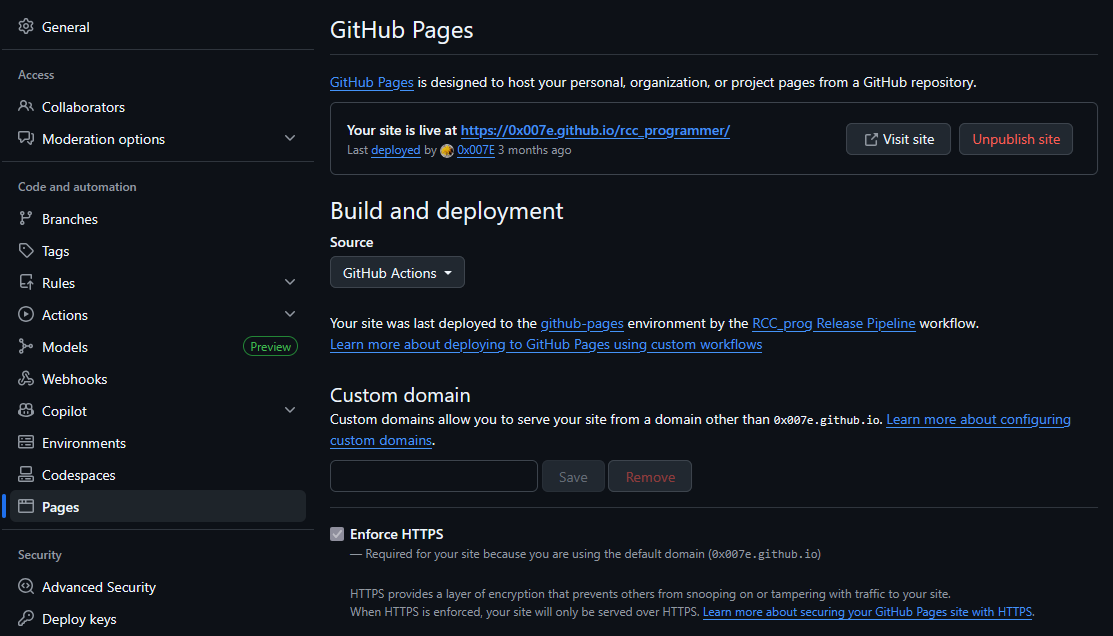
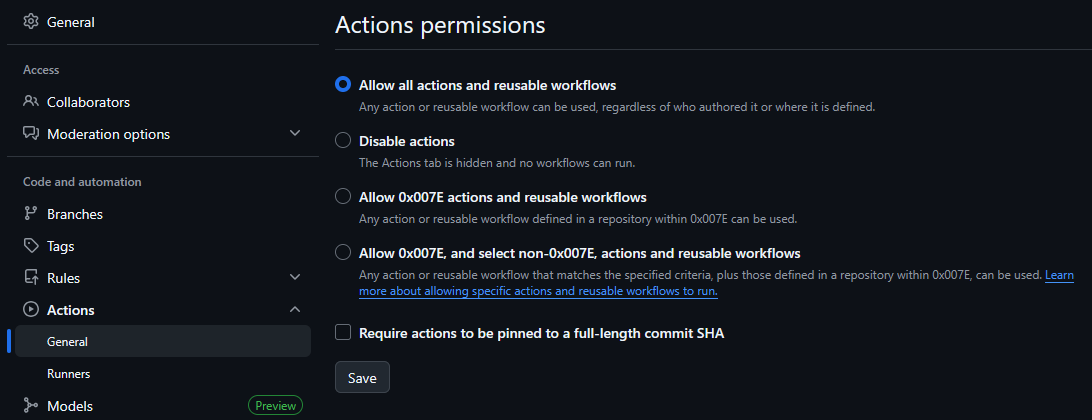
Now necessary permissions have to be activated in the Action -> General settings.
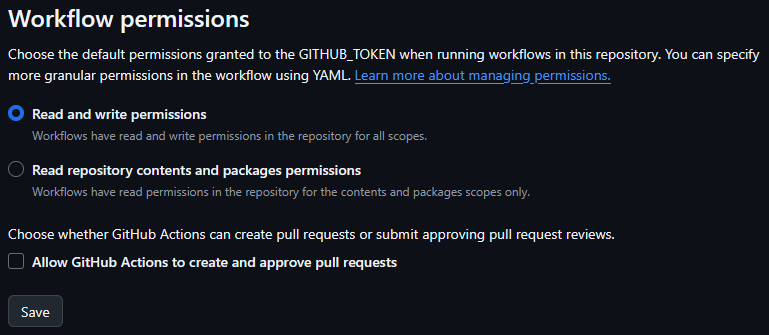
Set the permissions to Read and Write.
Security
Prepare the certificate as base64 string:
base64 ./clickonce.pfx > ./clickonce.pfx.base64
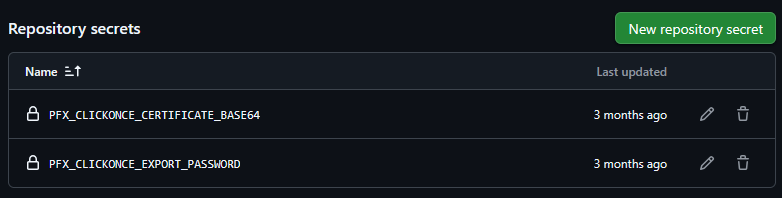
Select Actions In the Secrets and variable settings to add the self-signed certificate and the export password in the Secrets and the config (ClickOnceProfile.xml) in the Variables section.

Alright now we just have to setup the github-workflow (.github/workflows/release.yml) to deploy the application.
name: RCC_prog Release Pipeline

on:
  push:
    branches:
    - main
  pull_request:
    branches:
    - main

permissions:
  contents: write
  pages: write
  id-token: write

concurrency:
  group: "pages"
  cancel-in-progress: false

jobs:
  build-software:
    env:
      SOLUTION_FILE: ".\\RaGae.Projects.RCC.sln"
      PROJECT_PATH: ".\\Programmer"
      PROJECT_FILE: "Programmer.csproj"
      RUNTIME_IDENTIFIER: "win-x64"
      READY_TO_RUN: true
      DOTNET_VERSION: "8.0.415"
    runs-on: windows-latest
    steps:
      - uses: actions/checkout@v3
      - uses: actions/setup-dotnet@v3
        with:
          dotnet-version: "$"
      - uses: microsoft/setup-msbuild@v2
        with:
          msbuild-architecture: x64
      - name: Restore packages
        run: dotnet restore $ --runtime $ -p:PublishReadyToRun=$
      - name: Decode and save PFX certificate
        shell: pwsh
        run: |
          $pfxBase64 = '$'
          $bytes = [Convert]::FromBase64String($pfxBase64)
          [IO.File]::WriteAllBytes("./clickonce.pfx", $bytes)
      - name: Import PFX certificate to Cert Store
        shell: pwsh
        run: |
          $password = ConvertTo-SecureString -String '$' -AsPlainText -Force
          Import-PfxCertificate -FilePath ./clickonce.pfx -CertStoreLocation Cert:\CurrentUser\My -Password $password
          Get-ChildItem Cert:\CurrentUser\My | select Subject,Thumbprint,HasPrivateKey,Provider
      - name: Publish ClickOnce
        run: |
          msbuild $\$ /t:publish /p:Configuration=Release /p:PublishProfile=ClickOnceProfile /p:PublishDir=.\publish /p:RuntimeIdentifier=$ /p:PublishReadyToRun=$
      - name: Create ClickOnce OutputFolder
        run: |
          mkdir .\data\clickonce
          cp -r $\publish\* .\data\clickonce\

      - name: Upload files as artifact
        id: deployment
        uses: actions/upload-pages-artifact@v3
        with:
          path: .\data

  deploy-pages:
    environment:
      name: github-pages
      url: $
    runs-on: ubuntu-latest
    needs: build-software
    steps:
      - name: Deploy to GitHub Pages
        id: deployment
        uses: actions/deploy-pages@v4
If everything works and the deployment succeeds the clickonce application is published to the link defined in ClickOnceProfile.xml (in this case https://0x007e.github.io/rcc_programmer/clickonce/). If now an update is released in the folder by incrementing the ApplicationVersion
<ApplicationVersion>0.0.1.*</ApplicationVersion>
After every deploy all clients that are using an old version of the application will now be informed that a new version is on the market  !
!