Loading...
Searching...
No Matches
ssd130x.h File Reference
Header file for SSD130X display control via hardware or software TWI/I2C. More...
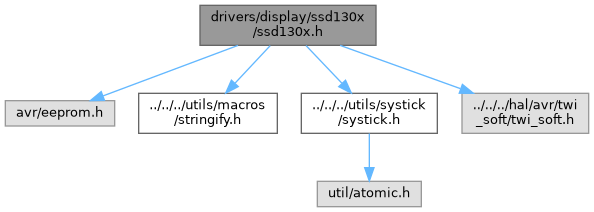
#include <avr/eeprom.h>#include "../../../utils/macros/stringify.h"#include "../../../utils/systick/systick.h"#include "../../../hal/avr/twi_soft/twi_soft.h"
Include dependency graph for ssd130x.h:
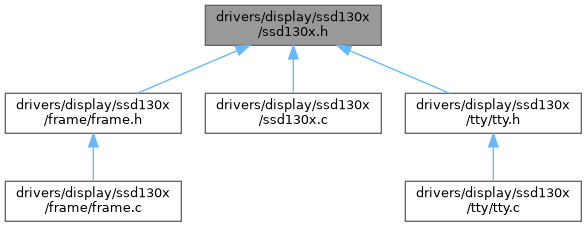
This graph shows which files directly or indirectly include this file:
Go to the source code of this file.
Functions | |
| void | ssd130x_init (void) |
| Initializes the SSD130X display. | |
| void | ssd130x_disable (void) |
| Disables the TWI interface used for SSD130X communication. | |
| void | ssd130x_home (void) |
| void | ssd130x_position (unsigned char column, unsigned char row) |
| Sets the current write position on the SSD130X display. | |
| void | ssd130x_scroll_vertical (unsigned char scroll) |
| Scrolls the SSD130X display vertically by a specified offset. | |
| void | ssd130x_frame (unsigned char *frame) |
| Displays a full frame (all pages) of pixel data on the SSD130X. | |
| void | ssd130x_page (unsigned char *data, unsigned char page) |
| Writes a full page of pixel data to the SSD130X display. | |
| void | ssd130x_page_segment (unsigned char *data, unsigned char column_start, unsigned char column_stop, unsigned char page) |
| Writes a segment of pixel data to a specific page on the SSD130X display. | |
| void | ssd130x_column (unsigned char data, unsigned char column, unsigned char page) |
| Writes a single byte of pixel data to a specific column and page on the SSD130X display. | |
| void | ssd130x_clear (void) |
| Clears the entire SSD130X display. | |
| void | ssd130x_clear_page (unsigned char page) |
| Clears a single page of the SSD130X display. | |
| void | ssd130x_clear_page_segment (unsigned char column_start, unsigned char column_stop, unsigned char page) |
| Clears a specific segment of a page on the SSD130X display. | |
| void | ssd130x_clear_column (unsigned char column, unsigned char page) |
| Clears a single column within a specified page on the SSD130X display. | |
Detailed Description
Header file for SSD130X display control via hardware or software TWI/I2C.
This file provides function prototypes, macro definitions, and constants for controlling a monochrome SSD130X display connected over TWI (I2C) interface. It supports both software and hardware TWI implementations selectable via macros. The file defines configuration parameters such as display dimensions, control bytes, timing settings, and command codes required to initialize and operate the SSD130X display.
- Note
- Functions declared here enable initializing the display, positioning the cursor, updating display content by pages or columns, clearing the display, and scrolling.
Macros abstract the underlying TWI communication method (software or hardware) for sending commands and data, to ensure flexible deployment depending on hardware capabilities.
- Date
- 2026-07-17
- Version
- 1.0 Release
- Copyright
- Copyright (c) 2026 g.raf Released under the GPLv3 License. (see LICENSE in repository)
- Note
- This file is part of a larger project and subject to the license specified in the repository. For updates and the complete revision history, see the GitHub repository.
- See also
- https://github.com/0x007e/drivers-display-ssd130x "SSD130X Display Driver GitHub Repository"
Macro Definition Documentation
◆ SSD130X_ADDRESS
| #define SSD130X_ADDRESS 0x3C |
I2C (TWI) slave address of the SSD130X display.
This macro defines the 7-bit I2C address of the SSD130X display device used for communication over the TWI bus. The address is derived by right-shifting the 8-bit address 0x78 to conform to the 7-bit addressing scheme used by the hardware TWI interface. It is used when initiating communication with the display to ensure data is sent to the correct device on the bus.
◆ SSD130X_CMD_SET_HIGHER_START_COLUMN_ADDRESS
| #define SSD130X_CMD_SET_HIGHER_START_COLUMN_ADDRESS 0x10 |
Command to set the higher nibble of the start column address in the SSD130X display memory.
This macro defines the command byte used to set the upper 4 bits (nibble) of the column start address, specifying the higher portion of the horizontal position in display RAM where data updates will begin.
- Note
- Combined with the lower nibble command, it allows full addressing across all columns.
Usage Example: Follow the lower nibble command and data with this higher nibble command and data (SSD130X_CMD_SET_HIGHER_START_COLUMN_ADDRESS | (data>>4)) to set the full column start address.
◆ SSD130X_CMD_SET_LOWER_START_COLUMN_ADDRESS
| #define SSD130X_CMD_SET_LOWER_START_COLUMN_ADDRESS 0x00 |
Command to set the lower nibble of the start column address in the SSD130X display memory.
This macro defines the command byte used to set the lower 4 bits (nibble) of the column start address, specifying the horizontal position in display RAM where data writing begins. It works in conjunction with the higher nibble address command to address the full (0-127) column range of the display.
Usage Example: To set the column start address, send this command with the lower nibble data (SSD130X_CMD_SET_LOWER_START_COLUMN_ADDRESS | data) followed by the command for the higher nibble.
◆ SSD130X_CMD_SET_PAGE_START_ADDRESS
| #define SSD130X_CMD_SET_PAGE_START_ADDRESS 0xB0 |
Command to set the start address of a page in the SSD130X display memory.
This macro defines the command byte used to select the page (row group) in the display RAM to begin writing data. The SSD130X display memory is organized into pages, each typically 8 pixels tall.
- Note
- Setting the page start address allows targeted updates to specific vertical sections of the display.
Usage Example: To write data to a specific page, send the command SSD130X_CMD_SET_PAGE_START_ADDRESS followed by the page number.
◆ SSD130X_COLUMN_SIZE
| #define SSD130X_COLUMN_SIZE 128UL |
Number of pixel columns in the SSD130X display.
This macro defines the horizontal resolution of the SSD130X display in pixels. It specifies how many columns of pixels the display has, which is important for memory addressing and graphical rendering on the display.
◆ SSD130X_CONTROL_COMMAND
| #define SSD130X_CONTROL_COMMAND 0x80 |
Control byte indicating a command for the SSD130X display.
This macro defines the control byte value sent before a command byte to the SSD130X display during TWI (I2C) communication. It signals to the display controller that the following byte(s) should be interpreted as commands rather than display data.
- Note
- Proper use of this control byte is essential for configuring and controlling the SSD130X hardware.
◆ SSD130X_CONTROL_DATA
| #define SSD130X_CONTROL_DATA 0x40 |
Control byte indicating data for the SSD130X display.
This macro defines the control byte value sent before display data bytes to the SSD130X display during TWI (I2C) communication. It signals to the display controller that the following byte(s) should be treated as pixel or graphic data to be rendered on the screen.
- Note
- Correct usage of this control byte ensures the proper update and display of graphical content.
◆ SSD130X_HAL_PLATFORM
| #define SSD130X_HAL_PLATFORM avr |
Sets the target platform for the SSD130X hardware abstraction layer (HAL), e.g., avr or avr0.
Define this macro with the name of the target platform to select the corresponding platform-specific implementations (such as BUS or TWI access) for the SSD130X driver.
Common values are avr (classic AVR architecture) or avr0 (AVR0/1 series).
- Note
- Set this macro as global define as a compiler symbol to select the correct libraries of the whole project.
◆ SSD130X_HOME
| #define SSD130X_HOME | ( | ) |
Value:
(ssd130x_position(0, 0))
void ssd130x_position(unsigned char column, unsigned char page)
Sets the current write position on the SSD130X display.
Definition ssd130x.c:129
Sets the cursor position to the top-left corner of the SSD130X display.
This macro calls the function ssd130x_position with coordinates (0, 0), which moves the cursor to the first column and first page (row) of the SSD130X screen.
- Note
- It is typically used to reset the write position before updating or clearing the display.
◆ SSD130X_IDLE_TIME_US
| #define SSD130X_IDLE_TIME_US 10 |
Delay time in microseconds after SSD130X TWI/I2C stop condition.
This macro defines the idle delay time in microseconds to wait after sending a stop condition to the SSD130X display over the TWI (I2C) bus. This delay ensures the display has sufficient time to process commands before the next communication starts.
◆ SSD130X_INIT_ROUTINE_IN_EEPROM
| #define SSD130X_INIT_ROUTINE_IN_EEPROM |
Store SSD130X initialization routine commands in EEPROM.
Defining this macro moves the SSD130X display initialization command sequence from program memory (flash) to EEPROM. This can help reduce flash usage and allow easier modification of initialization commands without recompiling the firmware.
- Note
- If not defined, the initialization routine is stored in program memory by default.
◆ SSD130X_PAGE_SIZE
| #define SSD130X_PAGE_SIZE 8UL |
Number of pixels per SSD130X page.
This macro defines the height of a single SSD130X page in pixels. The SSD130X display memory is organized in pages of this size, which is used for addressing and updating the display in page mode.
◆ SSD130X_ROW_SIZE
| #define SSD130X_ROW_SIZE 64UL |
Number of pixel rows in the SSD130X display.
This macro defines the vertical resolution of the SSD130X display in pixels. It specifies how many rows of pixels the display has, used to calculate display memory size and addressing for rendering graphics.
◆ SSD130X_USE_SOFT_TWI
| #define SSD130X_USE_SOFT_TWI |
Enable software-based TWI (I2C) communication for the SSD130X display.
Define this macro to use a software-implemented TWI (bit-banging) interface for communication with the SSD130X display. If this macro is not defined, the library defaults to using the hardware TWI (I2C) peripheral of the system. Software TWI can be useful on systems without hardware TWI support or if pin flexibility is required.
- Note
- To disable software TWI and use hardware TWI instead, comment out or undefine this macro.
Function Documentation
◆ ssd130x_clear()
| void ssd130x_clear | ( | void | ) |
Clears the entire SSD130X display.
This function iterates through all display pages and clears each one by calling ssd130x_clear_page. After clearing all pages, it resets the cursor position to the home position (0,0) using SSD130X_HOME.
- Note
- This effectively resets the display content, turning off all pixels.
Here is the call graph for this function:

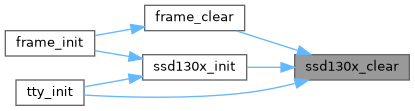
Here is the caller graph for this function:
◆ ssd130x_clear_column()
| void ssd130x_clear_column | ( | unsigned char | column, |
| unsigned char | page ) |
Clears a single column within a specified page on the SSD130X display.
- Parameters
-
column The column index (horizontal position) to clear. page The page index (vertical position in groups of 8 pixel rows) where the column resides.
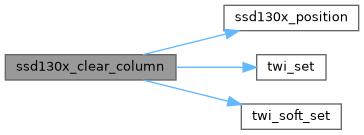
This function sets the cursor to the specified column and page, then writes a single zero byte to turn off all pixels in that column for the specified page. Communication with the display is done via TWI, using start and stop conditions, and the data control byte.
- Note
- Clearing a column effectively resets the pixels in that vertical segment to off.
Here is the call graph for this function:
◆ ssd130x_clear_page()
| void ssd130x_clear_page | ( | unsigned char | page | ) |
Clears a single page of the SSD130X display.
- Parameters
-
page The page index (0-based) to clear. Must be less than SSD130X_ROW_SIZE/SSD130X_PAGE_SIZE.
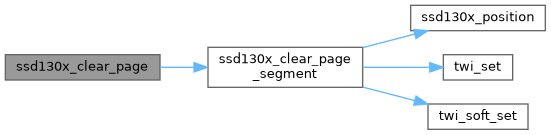
This function clears all columns within the specified page by calling ssd130x_clear_page_segment with the full column range from 0 to SSD130X_COLUMN_SIZE - 1.
- Note
- It turns off all pixels on that page, effectively wiping the displayed content in that segment.
Here is the call graph for this function:
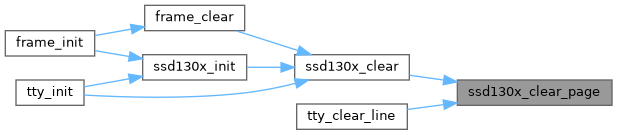
Here is the caller graph for this function:
◆ ssd130x_clear_page_segment()
| void ssd130x_clear_page_segment | ( | unsigned char | column_start, |
| unsigned char | column_stop, | ||
| unsigned char | page ) |
Clears a specific segment of a page on the SSD130X display.
- Parameters
-
column_start The starting column index of the segment to clear (inclusive). column_stop The ending column index of the segment to clear (inclusive). page The page index (0-based) on which the segment is located. Must be less than SSD130X_ROW_SIZE/SSD130X_PAGE_SIZE.
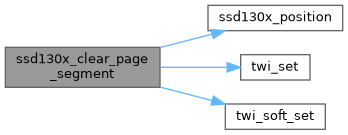
This function clears a horizontal segment of a specified page by writing zeroes (turning off pixels) to the display RAM across the specified column range. It first validates the input parameters to ensure they are within the display boundaries and that column_start is less than or equal to column_stop. After setting the cursor position to the start column of the specified page, it sends a series of zero bytes over the TWI interface to clear each column in the segment. Communication starts with a start condition and a control byte indicating data transmission, and ends with a stop condition.
Here is the call graph for this function:
Here is the caller graph for this function:

◆ ssd130x_column()
| void ssd130x_column | ( | unsigned char | data, |
| unsigned char | column, | ||
| unsigned char | page ) |
Writes a single byte of pixel data to a specific column and page on the SSD130X display.
- Parameters
-
data The byte of pixel data to write; each bit represents a pixel in the vertical column. column The column index (horizontal position) where the data should be written. page The page index where the data should be written.
- Note
- Both column and page must be within the display bounds (SSD130X_COLUMN_SIZE and SSD130X_ROW_SIZE/SSD130X_PAGE_SIZE respectively).
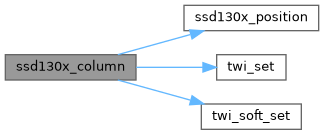
This function updates the pixel data of one specific column within a specified page. It first verifies that the target page and column are valid. Then, it sets the SSD130X cursor to the specified position and sends the pixel data byte via TWI. Communication begins with a start condition and a control byte indicating data transmission, followed by the data byte, and ends with a stop condition.
Here is the call graph for this function:
Here is the caller graph for this function:

◆ ssd130x_disable()
|
inline |
Disables the TWI interface used for SSD130X communication.
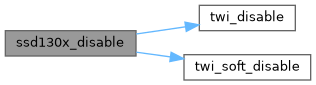
This inline function disables the TWI (I2C) peripheral or software interface used to communicate with the SSD130X display, depending on whether software or hardware TWI is enabled. It is used to safely release TWI resources when SSD130X communication is no longer required, helping to reduce power consumption or prevent bus contention.
Here is the call graph for this function:
◆ ssd130x_frame()
| void ssd130x_frame | ( | unsigned char * | frame | ) |
Displays a full frame (all pages) of pixel data on the SSD130X.
- Parameters
-
frame Pointer to an array containing pixel data for the entire display, organized as consecutive pages.
This function updates the entire SSD130X screen by sequentially writing data page by page. It first resets the current cursor position to the home position (0,0), then iterates over all pages, calling ssd130x_page to write each page’s data.
- Note
- The frame parameter should contain SSD130X_PAGE_SIZE pages of pixel data, where each page holds pixel data for the full width of the display.
Here is the call graph for this function:

◆ ssd130x_home()
| void ssd130x_home | ( | void | ) |
◆ ssd130x_init()
| void ssd130x_init | ( | void | ) |
Initializes the SSD130X display.
This function initializes the TWI (I2C) communication interface to the SSD130X display, supports both software and hardware TWI based on compile-time configuration. It then sends a predefined sequence of initialization commands stored either in EEPROM or program memory to configure the SSD130X hardware registers and settings. After sending the initialization commands, the communication is ended with a stop condition, and the display is cleared to prepare it for use.
- Note
- This function must be called once during system startup before any display operations.
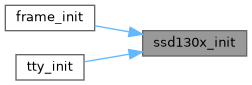
Here is the call graph for this function:

Here is the caller graph for this function:
◆ ssd130x_page()
| void ssd130x_page | ( | unsigned char * | data, |
| unsigned char | page ) |
Writes a full page of pixel data to the SSD130X display.
- Parameters
-
data Pointer to an array containing pixel data for one display page. page The page index (0-based) to which the data should be written. Must be less than SSD130X_ROW_SIZE/SSD130X_PAGE_SIZE.
This function writes pixel data to a complete page (horizontal row of 8 pixel rows) on the SSD130X display. It performs boundary checking on the page parameter; if the page is invalid, the function returns without action.
- Note
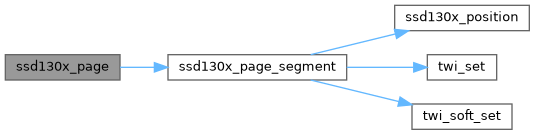
- Internally, it calls ssd130x_page_segment to update the entire width of the display on the specified page, passing the full column range from 0 to SSD130X_COLUMN_SIZE - 1.
Here is the call graph for this function:
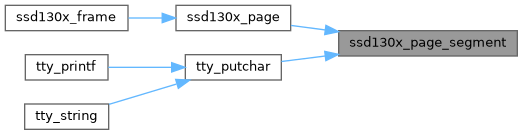
Here is the caller graph for this function:

◆ ssd130x_page_segment()
| void ssd130x_page_segment | ( | unsigned char * | data, |
| unsigned char | column_start, | ||
| unsigned char | column_stop, | ||
| unsigned char | page ) |
Writes a segment of pixel data to a specific page on the SSD130X display.
- Parameters
-
data Pointer to an array containing pixel data for the segment to write. column_start The starting column index of the segment (inclusive). column_stop The ending column index of the segment (inclusive). page The page index (0-based) where the data should be written. Must be less than SSD130X_ROW_SIZE/SSD130X_PAGE_SIZE.
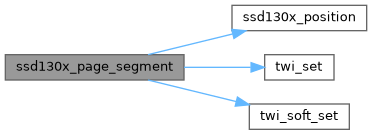
This function writes a horizontal segment of pixel data on a specified page of the SSD130X display. It first validates the input parameters to ensure the page and column ranges are within the display bounds, and that the column start is less than the column stop.
The display cursor is set to the starting column and page before data transmission. Data bytes are then sent sequentially to the SSD130X over the TWI interface, using either software or hardware TWI accordingly. Communication begins with a start condition and control byte indicating data transmission, and ends with a stop condition.
Here is the call graph for this function:
Here is the caller graph for this function:
◆ ssd130x_position()
| void ssd130x_position | ( | unsigned char | column, |
| unsigned char | page ) |
Sets the current write position on the SSD130X display.
- Parameters
-
column The column index (horizontal position) to set, must be less than SSD130X_COLUMN_SIZE. page The page index to set, must be less than SSD130X_ROW_SIZE/SSD130X_PAGE_SIZE.
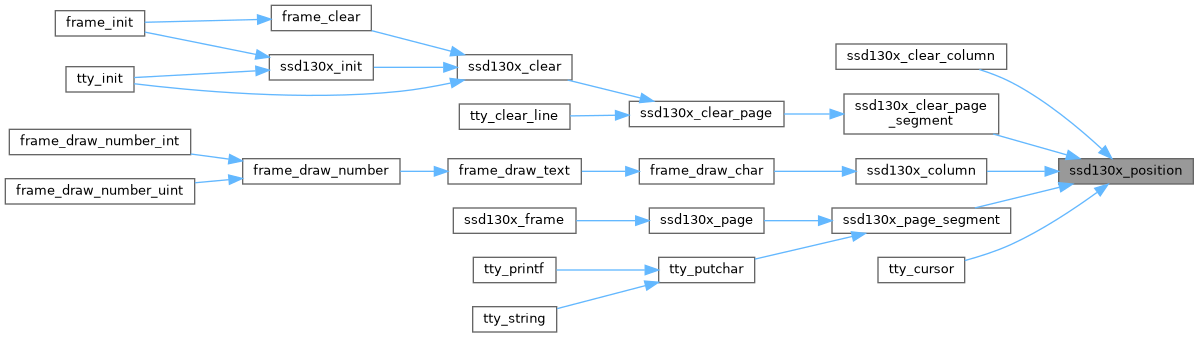
This function updates the internal tracking variables column_current_position and page_current_position to the specified values and sends the corresponding commands to the SSD130X controller to set the memory addressing position for subsequent pixel data writes. It sends commands to set the page start address and the lower and higher nibbles of the column start address. Communication is done over the TWI interface in write mode.
- Note
- If the requested position exceeds display bounds, the function does nothing.
Here is the caller graph for this function:
◆ ssd130x_scroll_vertical()
| void ssd130x_scroll_vertical | ( | unsigned char | scroll | ) |
Scrolls the SSD130X display vertically by a specified offset.
- Parameters
-
scroll The number of pixel rows to offset the display vertically. Must be less than SSD130X_ROW_SIZE to be valid.
This function adjusts the vertical display offset by sending the appropriate command and data to the SSD130X controller via TWI interface. It effectively shifts the visible area of the display vertically by the specified number of pixel rows, creating a scrolling effect.
- Note
- If the scroll value is equal to or exceeds the maximum row size, the function does nothing.